Sessions view
#/sessions — your lap archive. Sessions are created automatically (split on car change
or race restart — see Lap detection & sessions) and
listed newest first.
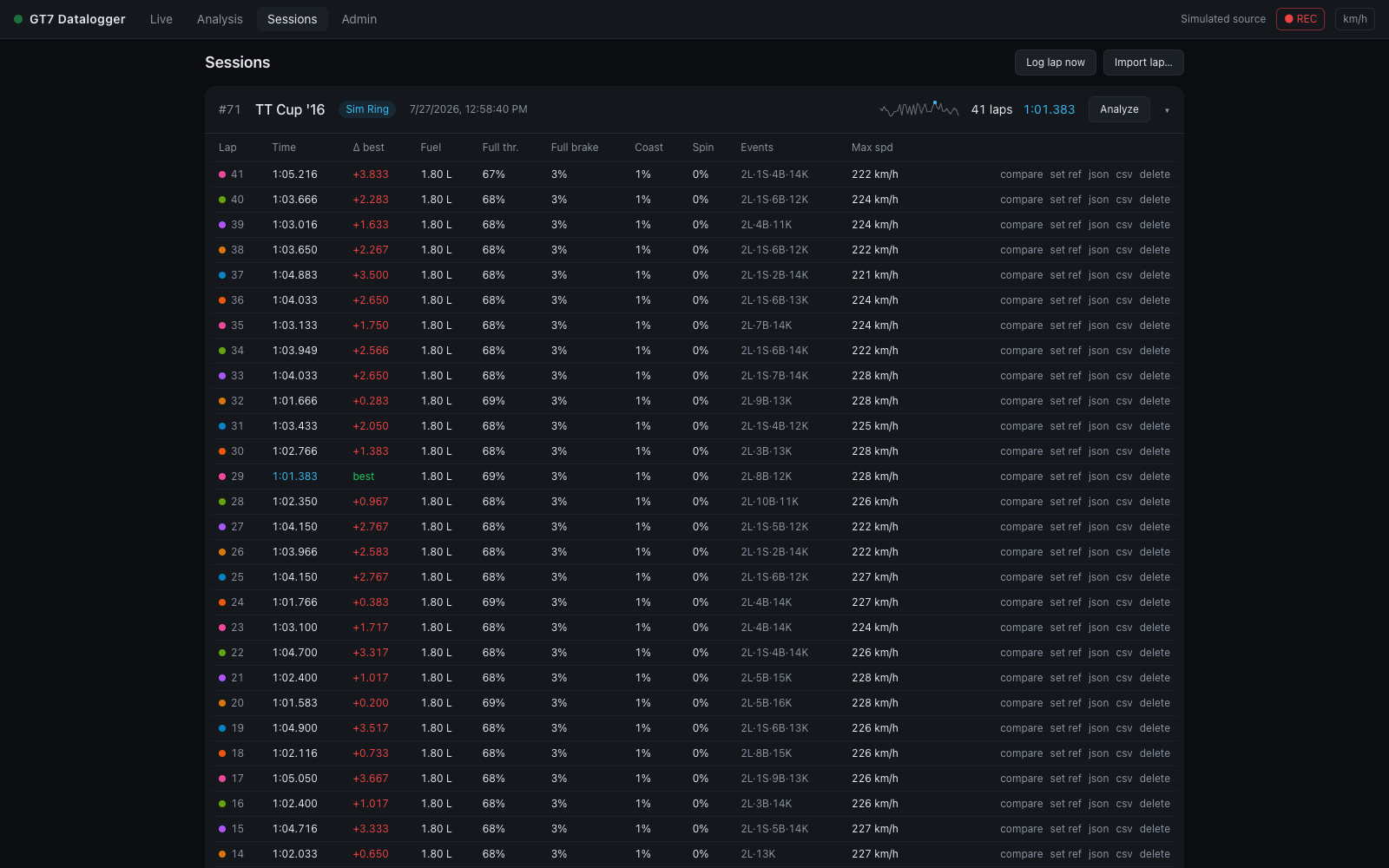
Session rows
Each row shows the session id, car, start time, lap count, best lap, a lap-time sparkline (chronological lap times with the best lap dotted in accent), and the track:
- a track badge when the track is known;
- a dashed name track… button when it isn't. Naming it fingerprints the circuit from the session's first lap, and every future session on that track is tagged automatically — see Track identification.
Click a row (or the chevron) to expand its lap table; Analyze opens the session in Analysis with latest vs best selected.
Category filter
When GT7 broadcasts the car's class (packet C — "Gr.3", "Gr.4", "N300"…), it appears as a chip on each row and a filter strip above the list: show me only the Gr.3 runs. Only classes actually present are offered, so the strip disappears entirely on a history recorded before packet C, and All is the only way back to sessions that have no class at all. A session whose own class is blank — its very first packet was a narrower format — takes the class its laps recorded.
Lap table
Per lap: time (best in accent), Δ to session best, fuel used, full-throttle %, full-brake %, coasting %, tire-spin %, events, and max speed.
The Events column is a compact code — 2L·1S·3B·1K means 2 lockups, 1 wheelspin,
3 suspension bottomings, 1 kerb strike; – means a clean lap.
The Off-track column can carry two figures, because two different judges watch the lap. The first counts excursions by GT7's own per-wheel surface flags (three or more wheels on the loose) — which are blind to paved run-off: running wide over asphalt reads as tarmac and stays "clean". The second appears once the circuit has been surveyed well enough (≥ 50 % of the road resolved): the lap's positions are judged against the surveyed edges, and sustained excursions beyond them count even on pavement. Unsurveyed stretches never count against a lap, and laps recorded before the session was identified are re-judged the moment it is. A lap is clean only when both judges agree.
Row actions:
| Action | What it does |
|---|---|
| compare | opens Analysis with this lap vs the session's best (best as reference) |
| set ref | opens Analysis with this lap as the reference |
| json | downloads the lap as gt7-lap-<id>.json — the full 60 Hz recording, shareable and re-importable |
| csv | downloads a MoTeC-compatible CSV for MoTeC i2 or Excel |
| delete | removes the lap and its telemetry (confirmed, irreversible) |
Delete session at the bottom of an expanded session removes the session and all its laps.
Header actions
- Log lap now — saves the in-progress lap immediately without waiting for the start line. Handy for capturing a partial run or a test.
- Import lap… — load a
.jsonlap file exported from any GT7 Datalogger instance. Older v1 files import cleanly; the newer per-corner channels are simply absent and the charts skip them. Events and aid metrics are recomputed from the samples on import.
Recording control
The ● REC / ○ Paused toggle in the status bar pauses lap recording globally — the live view keeps streaming, but nothing is written to the database until you resume.
See Lap file format for what's inside the JSON and CSV exports.