Live view
#/live — the default view. Big race readouts that update continuously from the
telemetry stream while you drive.
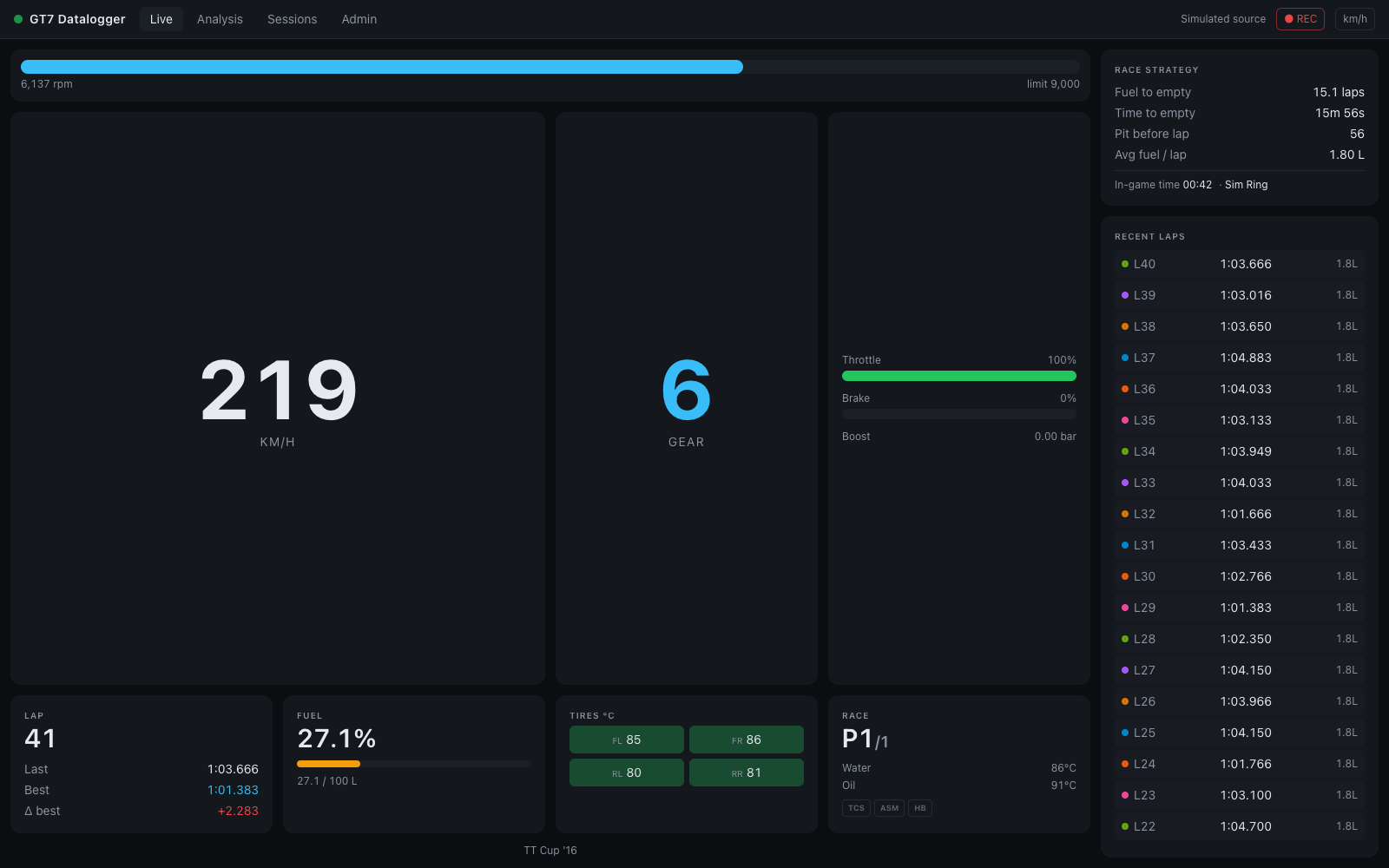
Panels
RPM bar — fills toward the shift point (rpm ÷ redline). It turns red at ≥ 95 % of
the redline or when the rev limiter engages, and pulses while you're actually on the
limiter.
Speed — converted to your units setting (toggle km/h ↔ mph in the status bar).
Gear — R for reverse, N for neutral. When the game suggests a downshift, a
gear → N hint appears under the number.
Inputs — throttle (green) and brake (red) bars with percentages. A boost row
(x.xx bar) appears automatically on turbocharged cars.
Lap panel — current lap (with /total in races, or FIN after the flag), last lap,
best lap, and Δ best — your last lap compared against the best before it, so a new
personal best shows the actual improvement (green ≤ 0, red if slower).
Fuel — percentage of tank with a bar that turns red below 15 %, plus liters remaining / capacity.
Tires °C — the four tire temperatures in a 2×2 layout, tinted by temperature:
blue below 55 °C (cold), green 55–95 °C (optimal), red at 95 °C and above (hot). A
TIRE SPIN warning flashes when average slip exceeds 1.1×.
Race panel — position (P3/16), water and oil temperature with warning colors for
long stints (water: amber ≥ 100 °C, red ≥ 110 °C; oil: amber ≥ 115 °C, red ≥ 130 °C),
and three driver-aid pills — TCS, ASM, HB — that light amber while that aid is
actively intervening.
The footer shows the car name, plus PAUSED / not on track states.
Race strategy panel
On larger screens the right column projects your fuel strategy from a rolling average of the last 3 fuel-consuming laps:
- Fuel to empty — laps left at current consumption (amber < 4 laps, red < 2)
- Time to empty — the same, in time
- Pit before lap — the last lap you can complete on this tank
- To finish — in races with a known length: green fuel OK, or red x.x L short
- Avg fuel / lap and the in-game clock (handy for endurance day/night cycles)
The panel stays empty until you complete a lap that actually consumed fuel — see Fuel & race strategy for the math.
Recent laps feed
Every completed lap appears in the feed (newest first) with its color dot, lap number, time, and fuel used. Click any lap to open it in the Analysis view with that session and lap pre-selected.
Status bar (all views)
- Status dot — green pulsing: receiving telemetry; amber: server up but no telemetry (check console IP / UDP 33740); red: browser lost the server.
- ● REC / ○ Paused — toggle lap recording on/off.
- km/h / mph — units toggle, persisted in the browser.
Empty state
Before any telemetry arrives, the view shows "Waiting for telemetry…". Start driving
in GT7, or run the server with GT7_SOURCE=sim to demo without a console.